Personalisation Selector Form
ARTWORK
Personalisation Forms Selector
In order to enable the customisation or personalisation of your garments, please click the button below for the appropriate garment personalisation.
You should have your order number ready and the list of items. The form then allows you to select the item and the 3 positions for the printing.
This online form allows you to enter details of designs, upload files, text, instructions or notes about the garments on your order.
Please note that we will resize any artwork to fit the area proportionately and to suit the garment size.
Permission to use the logo and texts sent to us must be in place before we can proceed.
[N.B. If the personalisation of the new order is exactly the same as a previous order, it is not necessary to fill out a form (simply reference the order number on the checkout notes)]

INCLUDED PRINTING
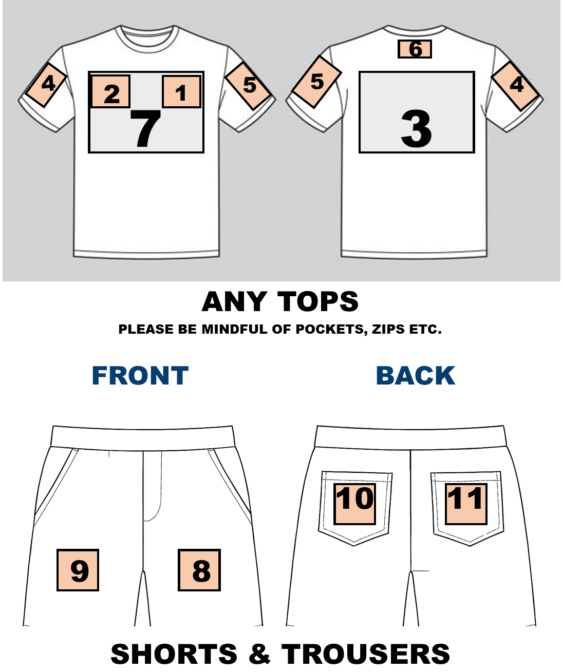
Select the 'Included Printing' button to detail the required printing, if any, for the 3 included areas for your ordered garments. If the same artwork is to be used for all garments in the order, then complete the form for item 1 and make a comment to apply to all remaining items.
- For each area, select the print area number as shown above & whether it should be images, text or no printing
- If text; select the font and colour. For fixed text type the exact wording required. This is what will be printed, including case, punctuation and symbols.
For variable text use the online variable text form to enter the text for each area on each garment e.g. Item2, Size XL, Manager - If image; upload the image file.
- Add any instructions or amendments in the comments box to ensure the requirements are met.
ADDITIONAL PRINTING
Select the 'Additional Printing' button to detail the required printing, for any additional print areas for your ordered garments. Please ensure that the correct number of Additional Print printing amendments were added to the order or contact us to take payments, or create a new order online for the additional printing.
For any embroidered areas please make a note in the comments field. Again, please check that the correct number of embroidery and digitising print amendments have been ordered.
If there is any doubt then please call on 01529 298232 or choose the option to upload sketches instead of filling in the forms. A free proof or mockup can always be provided if necessary.
Note: To access all fields, please view the forms in landscape mode when using a mobile device